This is the multi-page printable view of this section. Click here to print.
Appendix
1 - 1. Open Source Policy (Sample)
1. Purpose
(1) Purpose of the Policy(3.1.3.1)
This policy provides the following principles for the correct use of open source software (hereinafter “Open Source”) by every organization at [Company Name], Inc. (hereinafter “the Company”) that is involved in software development, service delivery, and distribution.
- Principles for carrying out compliance with open source licenses
- Principles for contributing to external open source projects
- Principles for releasing internal projects as open source
These principles give every member of the Company a way to understand the value of open source, use open source correctly, and contribute to open source communities.
All members of the Company can find the open source policy at the following link on the internal wiki: [internal_link](3.1.1.1)
(2) Impact of Non-Compliance
Failure to comply with this policy can result in the following situations.
- The Company receives demands from outside parties to comply with open source licenses.
- The Company is forced to release source code it did not intend to release.
- The Company faces legal action from open source copyright holders.
- The Company is fined for copyright infringement or breach of contract, or is ordered to stop selling a product.
- The Company’s reputation suffers.
- The Company breaches a contract with a supplier and faces a claim for damages.
For these reasons, the Company treats violations of this open source policy as serious, and members or organizations that violate it may be subject to disciplinary action.
(3) How Members Can Contribute
All members of the Company can contribute to the effectiveness of this policy and to raising the Company’s compliance level by understanding the rationale and content of this policy and faithfully carrying out the required activities.
2. Scope(3.1.4.1)
This policy applies to the following three areas.
- It applies to [all products the Company provides or distributes externally]. However, using open source solely for internal purposes is not within the scope of this policy.
- It applies when a member contributes to an external open source project.
- It applies when releasing internal code as open source.
The scope can be changed to fit the Company’s business environment, and the procedure for doing so is as follows.
- If the open source program manager determines that a change in the policy’s scope is needed due to changes in the Company’s business environment, such as new business or organizational restructuring, they submit a proposal for this to the OSRB.
- The OSRB approves an appropriate level of change to the scope.
- The OSRB revises the open source policy to change the policy’s scope.
3. Terminology
- BOM (Bill of Materials)
- Software distribution participant: refers to any employee involved in the Company’s development, distribution, or contribution of software, including software developers, release engineers, and quality engineers.
- …
4. Roles, Responsibilities, and Competencies(3.1.2.1)
To ensure the effectiveness of this policy, the following roles, responsibilities, and the competencies required of each role’s assignee are defined.
The organization/person responsible for each role and the required competency level are defined in [Appendix 1. Roster of Responsible Parties].(3.1.2.2)
- The open source program manager periodically updates the roster to fit the Company’s business situation.(3.2.2.1)
- The head of the organization responsible for each role designates a person in charge within the organization and allocates appropriate time and budget so that person can carry out the role faithfully.(3.2.2.2)
- If a person responsible for a role feels they are not receiving adequate support in carrying it out, they must raise the issue with the open source program manager.
- The open source program manager discusses resolving the issue with the relevant head of organization. If it is not resolved appropriately, the open source program manager can ask the OSRB to help resolve the issue.
- The OSRB shares the issue with the head of the higher-level organization and requests a resolution.
(1) OSRB
The OSRB (Open Source Review Board) is a body composed of the open source program manager and the heads of relevant organizations, including Legal, Patents, Development, and Infrastructure, formed for the Company’s open source compliance.
- It creates the policies and processes for open source compliance and defines the roles and responsibilities within the Company for carrying them out.
- When an open source compliance issue arises within the Company, it discusses solutions and prepares a response.
- When necessary, it reports issues to executive leadership and obtains feedback on risk mitigation measures.
(2) Open Source Program Manager
The open source program manager is overall responsible for the Company’s open source program. To ensure open source compliance for products and services that use open source, they are responsible for the following.(3.2.2.4)
- Define the roles needed for open source compliance and designate the responsible organization and person for each role. Consult with the OSRB as needed.
- Organize and evaluate open source compliance training.
- Chair the OSRB and direct its activities.
- Respond to inquiries and requests from outside parties about open source use and compliance.
- Review and approve requests to use open source.
- Maintain records of the open source BOM.
- Provide members with a way to obtain open source-related legal counsel.(3.2.2.3)
- Maintain a repository for open source notices and source code releases.
(3) OSPO
The OSPO (Open Source Program Office) supports and fosters the growth of open source activity both inside and outside the Company.
- Establishes, improves, and disseminates the open source policy.
- Provides guidance for contributing code to external open source projects.
- Provides guidance for releasing internal projects as open source.
- Develops and operates the open source portal.
- Develops and selects open source tooling.
- Sponsors open source project events.
- Manages relationships with open source communities.
(4) Legal
Legal provides counsel on the legal risks that can arise in the course of using open source, and on mitigation measures, including interpreting open source licenses and obligations.
- Provides counsel on license and intellectual property issues, including conflicts arising from incompatible open source licenses.
- Reviews the legal matters required for contributing to external open source projects, including the open source license and the CLA (Contributor License Agreement).
(5) IT Infrastructure
IT Infrastructure operates and automates open source analysis tooling, and builds the systems needed to ensure license analysis is carried out smoothly for all distributed software.
- Operates open source license analysis tooling.
- Integrates with the DevOps environment to automate license analysis.
- Builds the systems and processes needed to ensure license analysis is performed on all distributed software.
- Obtains and maintains the open source BOM for all distributed software.
(6) Security
Security operates open source security vulnerability analysis tooling and builds the systems needed to ensure security vulnerability analysis is carried out smoothly for all distributed software.
- Operates open source security vulnerability analysis tooling.
- Integrates with the DevSecOps environment to automate open source security vulnerability analysis.
- Builds the systems and processes needed to ensure open source security vulnerability analysis is performed on all distributed software.
(7) Developer Relations
Developer Relations supports in-house developers so they can actively use open source, participate in internal and external communities, and adopt leading development practices.
- Encourages participation in open source communities.
- Fosters a culture that recognizes active external open source project activity as an internal accomplishment.
- Builds a development culture that makes the Company attractive to open source developers.
(8) Quality
The organization responsible for quality, such as QA, confirms that open source license obligations were properly carried out when software is distributed.
- Confirms that open source compliance activities were carried out at each stage of the development process.
- Confirms that the artifacts required by the open source licenses were produced.
- Confirms that the open source notice and any source code to be released are provided together with the distributed software.
- Notifies the software development/distribution organization of any issues found so they can be corrected immediately.
5. Training and Assessment
Every software distribution participant must complete the mandatory open source training provided on the [Learning Portal] each year. This ensures they are familiar with the open source policy, the related training policy, and how to look it up. Training records are retained on the [Learning Portal].(3.1.1.2)
Every member responsible for a role defined in Section 4 must complete the advanced open source training course provided on the [Learning Portal]. Training records and assessment results are retained on the [Learning Portal] for at least three years.(3.1.2.3)
6. Open Source Use
To develop and distribute products and services using open source, the obligations required by each open source license must be complied with. This activity is called open source compliance.
To carry out open source compliance correctly, the software development/distribution organization must comply with the following.(3.3.1.1)
- Every step of the open source compliance process is recorded and retained in the Jira Tracker.
(1) Identifying Open Source and Reviewing License Obligations
When introducing open source into product/service development, first identify what open source license applies, and review and confirm the obligations the license requires.
The Company’s [Open Source License Guide] includes a list of major open source licenses, and for each license, it separately explains the obligations required for each of the following distribution forms.(3.3.2.1)
- Binary form
- Source form
- Strong/weak copyleft
- SaaS-based delivery
- Whether modified
- Inclusion of open source requiring attribution, and so on.
The software development/distribution organization can refer to this guide when reviewing open source license obligations. If a review is needed for an open source license not covered in this guide, contact the open source program manager.
(2) Designing with Open Source Licenses in Mind
Identify the combination relationships of open source components and design the software architecture so that the Company’s own code is not affected by open source license terms.
The Company’s [Open Source License Guide] explains, for each open source license, the scope of source code disclosure it requires and design methods for preventing disclosure of the Company’s own code.
(3) Producing Open Source Compliance Artifacts
The most basic part of open source compliance activity is understanding the open source contained in distributed software. This is precisely so that the open source license requirements at the core of open source compliance can be correctly satisfied. In other words, a set of compliance artifacts must be produced for the open source contained in distributed software.(3.4.1.1)
Open source compliance artifacts fall into two broad categories.
- Open source notice: a document providing the full text of each open source license and copyright information
- Source code package to be released: a package assembling the source code to be released to fulfill the obligations of open source licenses that require source code disclosure, such as GPL and LGPL
To assemble, distribute, and store these compliance artifacts, the following must be complied with.(3.4.1.2)
- Assemble the open source notice and the source code package to be released according to the conditions each license requires. For example, if a license requires that the full text of the license be included, providing only a link is not sufficient.
- Store the assembled artifacts in a separate repository.
- When providing source code to be released through a Written Offer, publish a download link so that external parties can access the repository of assembled artifacts.
The Company’s open source compliance process can be used to issue the open source notice and assemble the source code package to be released.
(4) Producing the Open Source BOM (Bill of Materials)
The open source contained in distributed software (BOM: Bill of Materials) must be produced and maintained.(3.3.1.2)
The Company’s open source compliance process can be used to produce and retain the open source BOM using open source tooling.
(5) Compliance Issue Remediation Procedure
When a compliance issue is raised, the open source program manager performs the following procedure to respond promptly.(3.2.2.5)
- Acknowledge receipt of the inquiry and specify an appropriate resolution time.
- Confirm whether the issue content points to an actual problem. (If not, inform the person who raised the issue that it is not a problem.)
- If it is an actual problem, determine priority and decide on an appropriate response.
- Carry out the response, and if necessary, appropriately update the open source compliance process.
- Retain the above content using the Jira Tracker.
7. Open Source Contribution
The Company encourages participation in and contribution to external open source projects to create business value from open source. However, approaching this without sufficient understanding of and strategy for the open source project ecosystem and how communities operate can lead to unintended exposure of the Company’s intellectual property or infringement of third-party rights. For this reason, when a member of the Company contributes to an external open source project, the following must be complied with.(3.5.1.1)
(1) Requesting Review and Approval
From a copyright standpoint, an open source contribution grants the open source project the right to modify, use, and distribute the contributed work. In some cases, it may even require assigning your copyright to the open source project. However, the copyright to a work created during a period of employment generally belongs to the employer. In other words, a work created by a Company member belongs to the Company. If a member contributes a work to open source on their own judgment, it can create unnecessary copyright infringement issues.
Therefore, if there is an open source project you wish to contribute to, follow the review request and approval procedure defined by the open source contribution process before making your first contribution.
However, for the following kinds of simple content, the copyright infringement risk is low, so members may contribute based on their own judgment without going through the review procedure.
- Small code snippets of 10 lines or fewer
- Questions and answers on Stack Overflow
- Administrative activity on GitHub, such as creating issues or reviewing/approving pull requests
(2) Contribute Only Code You Have the Right to Contribute
Contribute only code you have the right to contribute. That is, contribute code you wrote yourself. Do not contribute third-party code on your own judgment.
(3) Beware of Intellectual Property Exposure
Do not contribute code or documents that raise concerns about exposing the Company’s intellectual property, such as sensitive information or patents.
- If the code you wish to contribute includes a Company patent, you must confirm whether it is acceptable to contribute that patent to the project under an open source license. If anything is unclear, contact the OSPO.
(4) Caution with CLA Signatures
Some open source projects require every contributor to sign a CLA (Contributor License Agreement). This is an agreement used to obtain contributors’ consent in order to reduce copyright disputes that can arise as a project manages the works of many contributors. Projects led by large corporations commonly require a CLA signature.
CLAs vary by project, but they generally include agreement to the following.
- I (or my employer) have the right to contribute the contribution I intend to contribute to the project. (That is, I am the author of this contribution.)
- I (or my employer) grant the project the right to modify, distribute, and manage my contribution.
- I (or my employer) will not revoke the granted rights.
- I (or my employer) grant the project the right to change its license in the future as needed.
In addition, though rare, some CLAs also require agreement to the following condition.
- I (or my employer), upon contributing my contribution, simultaneously assign my copyright in it to the project or the organization managing the project.
To protect its own intellectual property, the Company does not permit contributions to open source projects that require copyright assignment. To make this determination, a Company member must request a review from the OSPO before signing, if the open source project they wish to contribute to requires a CLA signature.
(5) Copyright Notice
The intellectual property of a work created by a member during their employment generally belongs to the Company. Accordingly, when a member contributes code to an external open source project, they must indicate the Company’s copyright.
When contributing one or more files, indicate the copyright and license at the top of the file as follows.
Copyright (c) {$year} {$Company}
SPDX-License-Identifier: {$SPDX_license_name}
Here, $SPDX_license_name is written according to the license policy of the relevant open source project.
However, if you are only modifying existing code, such as for a bug fix, there is no need to add a copyright notice for that code change.
(6) Use of Company Email
Do not use a personal email address when contributing to open source projects; use your Company email address. This (1) gives members a sense of responsibility as they communicate with the community on the Company’s behalf, and (2) helps improve the Company’s recognition as one that actively contributes to open source communities.
8. Open Source Release
The Company respects the value of collaboration with open source communities and encourages releasing internal software as open source projects. However, there are some rules that must be followed to protect the Company’s intellectual property and prevent unintended copyright infringement.
(1) Approval
From a copyright standpoint, an open source release grants anyone the right to modify, use, and distribute the work through an open source license. The copyright to a work created during a period of employment generally belongs to the employer. In other words, a work created by a Company member belongs to the Company. If a member releases a work as open source on their own judgment, it can create unnecessary copyright infringement issues.
Therefore, if you wish to release software as open source, follow the review request and approval procedure under the Company’s open source release policy.
If anything about the release process seems questionable, do not hesitate to contact the OSPO.
(2) Release Only Code You Have the Right to Release
One of the worst situations that can arise in an open source project is the inclusion of legally problematic code in the project. Code the Company does not have the right to distribute, or code that infringes another company’s IP such as a patent, can create legal problems. Therefore, when preparing code for release, verify the origin of all code and remove any code that raises concerns.
(3) Beware of Intellectual Property Exposure
Do not release code or documents that raise concerns about exposing the company’s intellectual property, such as sensitive information or patents.
If the code you wish to release includes a Company patent, confirm whether it is acceptable to release that patent under an open source license. If anything is unclear, contact the OSPO.
(4) Release Useful Code
For a project to succeed, it must also be useful to others. If a similar project already exists, participate in the existing project rather than creating a new one.
The open source you plan to release should be expected to (1) provide differentiated value to the open source community, (2) solve a problem the community has not yet solved, and (3) draw positive attention by showcasing our technical capability.
- Do not release code as open source if it has not been used in an actual product or service.
- Do not release code that addresses a problem the open source community has already solved. In such cases, contribute to the existing open source project instead.
(5) Securing Resources
Secure the resources, including developers, that need to be committed to the project.
- Initially, a level of developer effort similar to a typical internal project is needed.
- Developers are needed who can quickly review external contributions.
- Roles from Legal and Marketing are also needed.
- Secure budget for the infrastructure required to maintain and manage the project. This includes tools for project hosting, such as GitHub.
If an environment with sufficient resource support cannot be created, do not release the software as open source.
(6) Use of Company Email
Do not use a personal email address for open source release activity; use your Company email address. This (1) gives members a sense of responsibility as they communicate with the community on the Company’s behalf, and (2) helps improve the Company’s recognition as a company that actively releases open source.
9. Responding to External Inquiries
(1) Responsibility for Responding to External Inquiries
The open source program manager is responsible for responding to inquiries and requests about open source compliance from outside the Company.(3.2.1.2)
- The open source program manager can assign all or part of the handling of an inquiry to an appropriate person within the Company. If necessary, the legal team is consulted for handling.
- Anyone who receives an external inquiry about open source compliance should notify the open source program manager so that a prompt response can be made.
(2) Publishing Contact Information
The open source program manager publicly provides the contact information of the responsible person so that external parties can make open source-related inquiries and requests.(3.2.1.1)
- Provide contact email address information in the open source notice.
- Register contact information in the Linux Foundation’s Open Compliance Directory.
(3) Procedure for Responding to External Inquiries
Responding quickly and accurately to external open source compliance inquiries can greatly reduce the risk of escalation to litigation. To this end, the Company complies with the external inquiry response procedure defined in the Company’s open source compliance process to respond to external open source compliance inquiries.(3.2.1.2)
10. OpenChain
The Company supports the spirit of the Linux Foundation’s OpenChain project and actively participates in it to raise the level of open source compliance across the software supply chain.
- By applying this open source policy, the Company ensures compliance with ISO/IEC 5230:2020 as of October 1, 2021.(3.6.1.1)
- The Company ensures that, for at least 18 months after obtaining conformance certification, it satisfies all requirements of OpenChain Specification version 2.1 and ISO/IEC 5230:2020.(3.6.2.1)
- The Company reviews conformance at intervals of at least 18 months and revises and updates the policy as needed.
Appendix 1. Roster of Responsible Parties
| No | Role | Responsibility | Required Competency | Responsible Organization | Assignee |
|---|---|---|---|---|---|
| 1 | Open Source Program Manager | Overall responsible for the Company’s open source program. | 1. Understanding of the software development process 2. Understanding of intellectual property related to open source licenses, such as copyright and patents 3. Expert knowledge of open source compliance 4. Open source development experience 5. Communication skills | CTO | [Name] |
| 2 | Legal | Interprets open source licenses and obligations. Provides counsel to mitigate the legal risks that can arise in the course of using open source, including actually fulfilling those obligations. | 1. Basic knowledge of the open source ecosystem 2. Expert knowledge of software copyright 3. Expert knowledge of open source licenses | Legal | [Name] |
| 3 | Infrastructure | Operates and automates open source analysis tooling, and builds the systems needed to ensure license analysis is carried out smoothly for all distributed software. | 1. Basic knowledge of the open source compliance process 2. Understanding of open source license analysis tooling 3. Expert knowledge of IT infrastructure | IT Infrastructure Team | [Name] |
| 4 | Security | Operates open source security vulnerability analysis tooling and builds the systems needed to ensure security vulnerability analysis is carried out smoothly for all distributed software. | 1. Basic knowledge of the open source compliance process 2. Understanding of open source license analysis tooling 3. Expert knowledge of security | Security Team | [Name] |
| 5 | Development culture | Supports in-house developers so they can actively use open source, participate in internal and external communities, and adopt leading development practices. | 1. Understanding of the software development process 2. Basic knowledge of open source compliance 3. Understanding of the open source policy | DR | [Name] |
| 6 | Development team | The software development/distribution organization complies with the open source policy and process for correct use of open source. | 1. Understanding of the software development process 2. Basic knowledge of open source compliance 3. Understanding of the open source policy 4. Basic knowledge of open source licenses | Development Team | All |
2 - 2. Open Source Compliance Process (Sample)
OOO Corporation (hereinafter “the Company”) actively utilizes open source software (hereinafter “open source”) while developing products and services that include software. The Company must carry out activities to comply with the obligations imposed by open source licenses when distributing software, and this is called open source compliance.
1. Process for Software Product Development/Distribution
The open source compliance process defines the procedures that must be performed to comply with open source license obligations at each development stage as the Company develops and distributes software products and services. All members involved in software product development/distribution comply with the following 10 steps of the open source compliance process.
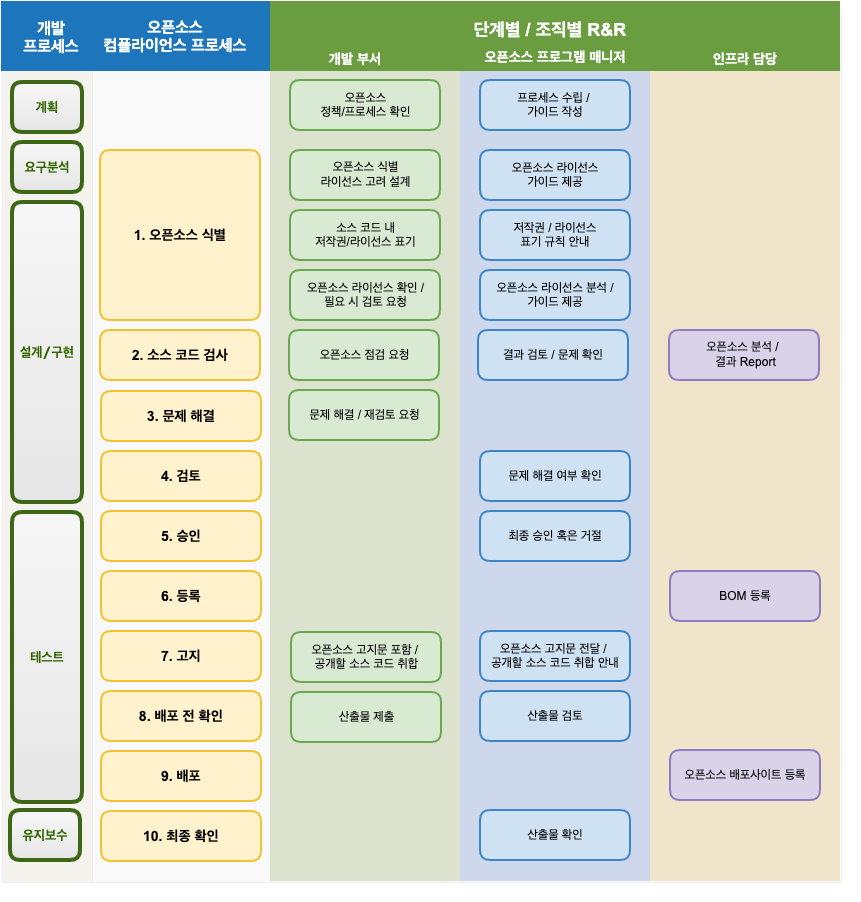
1. Identification of Open SourceIdentification of Open Source
The development department complies with the following during the software design stage.
- While designing the software, identify the anticipated open source usage status and check the licenses.
- Check the obligations for each open source license. License-specific obligations can be found in the Company’s open source license guide.
- Design the software considering the source code disclosure scope of each open source license.
The Open Source Program Manager writes and publishes a guide on the obligations, restrictions, and rights of major open source licenses so that development departments across the company can reference it.
The development department marks copyright and license notices in the source code in accordance with company rules. The Company’s rules for copyright and license notation within source code can be found on the following page. : (insert_link)
When reviewing the adoption of new open source, the development department first identifies the license. It checks the license obligations, restrictions, and rights according to the Company’s open source license guide. If the license is not covered by the Company’s open source license guide, the department inquires with the Open Source Program Manager about whether adoption is possible and any precautions. The inquiry is made by creating a Jira Ticket.
The Open Source Program Manager analyzes the open source license obligations and guides the software development organization accordingly.
- If there are questions, advice is requested from the legal officer to provide clear guidance.
- Newly analyzed license information is reflected in the company-wide license guide.
2. Auditing Source CodeAuditing Source Code
The development department provides the source code according to the infrastructure officer’s guidance and requests an open source check.
The infrastructure officer performs the open source check using an open source analysis tool and generates the open source BOM.
The Open Source Program Manager reviews whether the open source license obligations can be met and whether there are open source license conflicts, and if there are issues, requests the development department to resolve them. Issues are created as Jira Tickets and assigned to the development department.
3. Resolving IssuesResolving Issues
The development department resolves all issues found during the source code auditing stage. It takes actions such as removing the problematic open source or replacing it with open source under a different license.
Once the development department resolves all identified issues, it resolves the Jira Ticket issue and requests a re-review.
4. ReviewsReviews
The Open Source Program Manager reviews whether all issues have been properly addressed. If necessary, the source code audit is performed again using the open source analysis tool.
5. ApprovalApproval
The Open Source Program Manager gives final approval or rejection of whether the open source compliance procedure was properly performed. In case of rejection, an explanation of the reason and a suggested method of correction are proposed to the development department.
6. RegistrationRegistration
The Open Source Program Manager finalizes the BOM for tracking the list of open source used in each version of the software.
The infrastructure officer registers the finalized BOM in the system. The BOM includes the list of open source contained in the Supplied Software and the following information.
- The name and version of the product (or service) of the Supplied Software
- List of open source
- Open source name / version
- Open source license
7. NoticesNotices
The Open Source Program Manager generates an open source notice to comply with the notice obligation. The open source notice includes the following items.
- Open source contact for open source-related inquiries
- Notice content for each open source
- Copyright
- Open source license name
- Copy of the open source license
- (if applicable) a Written Offer to obtain a copy of the source code
The Open Source Program Manager generates the open source notice and delivers it to the development department. If source code disclosure is required at this time, the department guides the development department on how to collect the source code to be disclosed.
The development department encloses the open source notice when distributing the product. For products with a screen, measures are taken so users can check it through a menu. (e.g., App > Menu > Settings > Copyright Information > Open Source Licenses)
If the development department has used open source under a license that requires source code disclosure, such as GPL or LGPL, it checks the scope of source code disclosure and collects the source code to be disclosed.
- The source code collected to comply with license obligations such as GPL and LGPL must match the source code that composes the binary installed on the product. That is, building the collected source code must produce the same binary as the one installed on the product.
8. Pre-Distribution VerificationsPre-Distribution Verifications
The development department submits the following artifacts to demonstrate that open source compliance activities were properly performed.
- The final open source notice included in the product
- Materials confirming that the open source notice is included in the product (e.g., a screen capture image showing the open source notice)
- (if applicable) the source code to be disclosed (submitted compressed into a single file)
The Open Source Program Manager reviews the materials submitted by the development department to confirm there are no issues.
9. DistributionDistribution
The Open Source Program Manager submits the compliance artifacts submitted by the development department to the infrastructure officer.
The infrastructure officer registers the compliance artifacts on the Company’s open source distribution site.
10. Final VerificationsFinal Verifications
The Open Source Program Manager conducts a comprehensive check, including whether the compliance artifacts were properly registered on the Company’s open source portal without issues and whether they can be downloaded externally without problems.
2. External Inquiry Response Process
Responding quickly and accurately to external open source compliance inquiries can greatly reduce the risk of escalation to litigation. To this end, the Company complies with the following process to respond to external open source compliance inquiries.
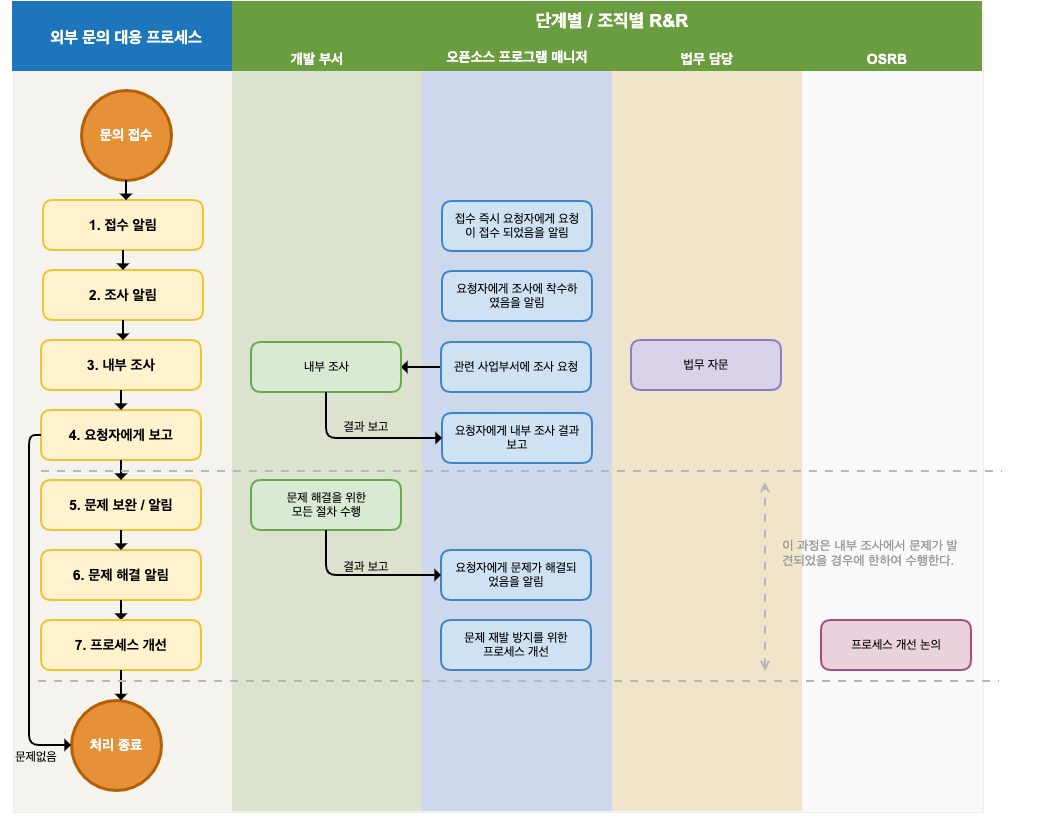
1. AcknowledgeAcknowledge
Upon receiving an inquiry, the Open Source Program Manager immediately notifies the requester that the inquiry has been received. At this time, the expected date of action is also communicated. Since it is important to accurately understand the requester’s intent, additional clarification is requested if the inquiry is unclear.
The main types of inquiries and requests that require a response are as follows.
- Inquiries about whether open source is used in a specific product or service
- Requests for source code under a GPL or LGPL license mentioned in a Written Offer
- Requests for explanation and source code disclosure for open source found in a product but not specified in the open source notice
- Requests to provide files missing from source code disclosed under GPL, LGPL, and similar obligations, and how to build it
- Requests for copyright attribution
The Open Source Program Manager creates a Jira Issue for the received request and records all response activities in detail.
2. InformInform
The Open Source Program Manager informs the requester that the Company is faithfully performing open source compliance and is investigating the requester’s inquiry. It is advisable to notify the requester whenever there is an update to the progress of the internal investigation.
3. InvestigateInvestigate
The Open Source Program Manager conducts an internal investigation of the request. Whether the compliance process was properly performed for the version of the product in question is confirmed through the BOM and documented review history. Advice is requested from the legal officer if needed.
If confirmation is needed from a specific development department, the Open Source Program Manager requests the development department to investigate. The development department that receives the investigation request immediately checks whether there is a problem with the compliance artifacts and reports the results to the Open Source Program Manager.
4. ReportReport
The open source compliance officer completes the internal investigation within the expected action date and notifies the requester of the results.
- If the requester’s inquiry was a mistaken claim due to a misunderstanding, the requester is notified of this without further action, and the case is closed.
- If the issue is confirmed, the requester is informed of the exact method and timing for fulfilling the obligations of the relevant open source license.
5. RectifyRectify
If an actual compliance problem is found during the internal investigation, the relevant development department performs all procedures necessary to resolve the compliance issue.
6. ReportReport
After the problem is resolved, the requester is notified immediately, and the best available method to confirm the resolution is provided.
7. ImproveImprove
When a compliance problem occurred, the case is reviewed at an OSRB meeting, the circumstances leading to the problem are identified, and the process is improved to prevent recurrence.
3 - 3. Tools (FOSSology, SW360)
Open source compliance activities require not only policies, processes, and training materials, but also a variety of tools and systems for source code scanning, dependency analysis, and open source Bill of Materials management. As a result, many companies are investing significant resources in adopting and operating these tools and systems. Companies that are just starting open source compliance face difficulties not only with process but also with cost.
To address these difficulties, in June 2019, the OpenChain Tooling Work Group was launched, led by open source compliance tool experts from companies participating in the OpenChain project, including Siemens, Bosch, Toshiba, Fujitsu, and Hitachi.
The OpenChain Tooling Work Group was formed so that open source experts from various companies could work together to solve issues and share results, reducing open source compliance costs and producing high-quality compliance outcomes.
Specifically, it aims to build a turn-key open source tool chain by leveraging existing open source projects such as FOSSology, SW360, Software Heritage, ClearlyDefined, and SPDX, and to make this freely available to all companies. (https://groups.io/g/oss-based-compliance-tooling)
This section introduces FOSSology and SW360 and provides a brief guide on how to use them.
3.1 - FOSSology
For open source compliance, a source code scanning tool can be used to detect the open source and license information contained within software.

The Linux Foundation’s FOSSology project is a tool that develops this kind of scanning tool and has released it as open source so that anyone can use it freely.
Key Features
FOSSology is a web-based program that allows users to log in to the website and upload individual files or software packages. FOSSology detects license text and copyright information within the uploaded files. It is a good idea for developers to use FOSSology when they want to check the license and copyright information of the open source they intend to use. FOSSology scans all files within the open source package uploaded by the developer, automatically detects license-related text and copyright information in each file, and generates this as a report. For more details on FOSSology’s key features, refer to the following page: https://www.fossology.org/features/
Installation
To use FOSSology within a company, a FOSSology server must be built in-house. To do this, FOSSology must be installed on a Linux-based server system. FOSSology can be installed using the following three methods.
- Using Docker
- Using Vagrant and VirtualBox
- Installing via a source build
Here, the simplest method, using Docker, is explained.
FOSSology publishes a containerized Docker image through Docker Hub (https://hub.docker.com/). : https://hub.docker.com/r/fossology/fossology
The pre-built Docker image can be run using the following command.
$ docker run -p 8081:80 fossology/fossology
The Docker image can be accessed using the following URL and account information. : http://[IP_OF_DOCKER_HOST]:8081/repo
- Username : fossy
- Passwd : fossy
For more details on installation, refer to the following page. : https://github.com/fossology/fossology/blob/master/README.md
Test Server
If it is difficult to build a system to install FOSSology, the test server provided by the FOSSology Project can be used. The FOSSology project provides an environment for testing. (The test server may be discontinued without notice.)
Users can access the FOSSology test server with the following account to try out FOSSology’s features.
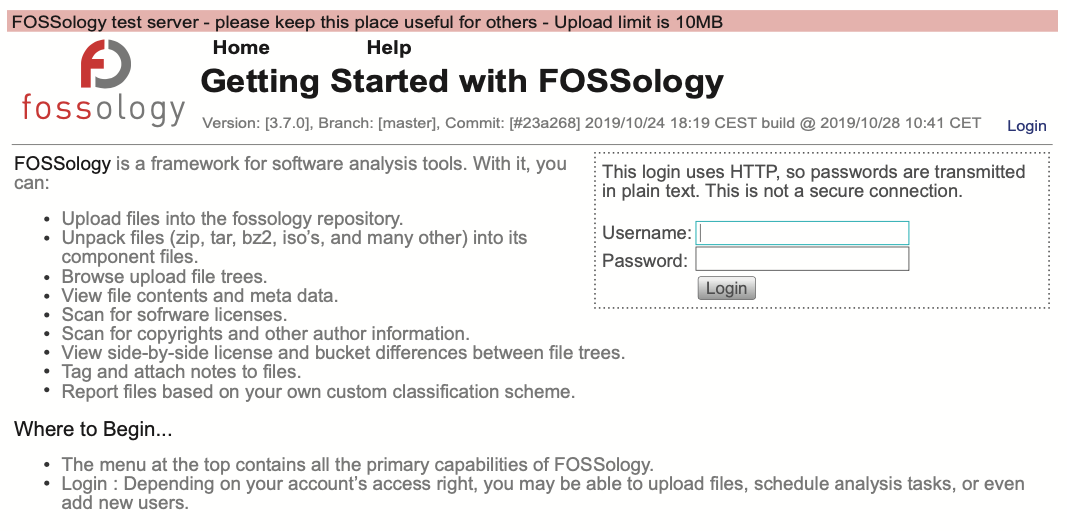
Basic Workflow
The basic usage procedure for FOSSology is as follows.
- To check the license and copyright information of the open source you want to use, compress the open source’s source code into a single file and upload it to FOSSology.
- To do this, select menu > Upload > From File.
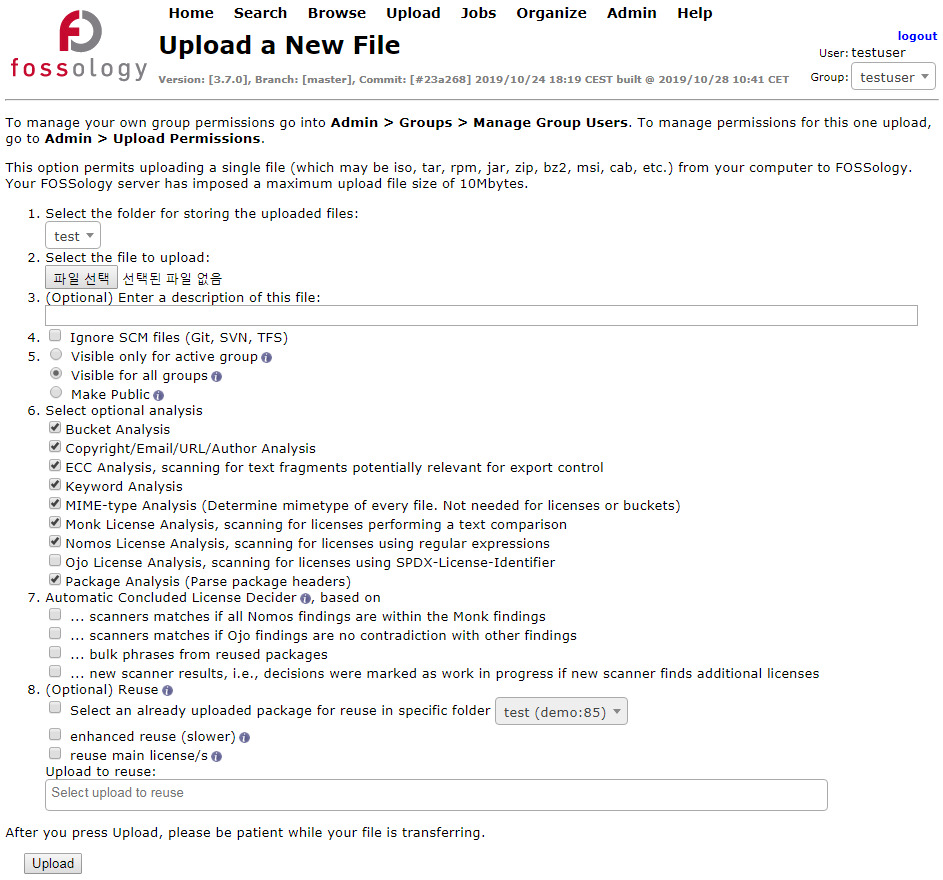
- Select the file to upload and click the Upload button.
- Once the upload is complete, the analysis is automatically performed by the Job Agent.
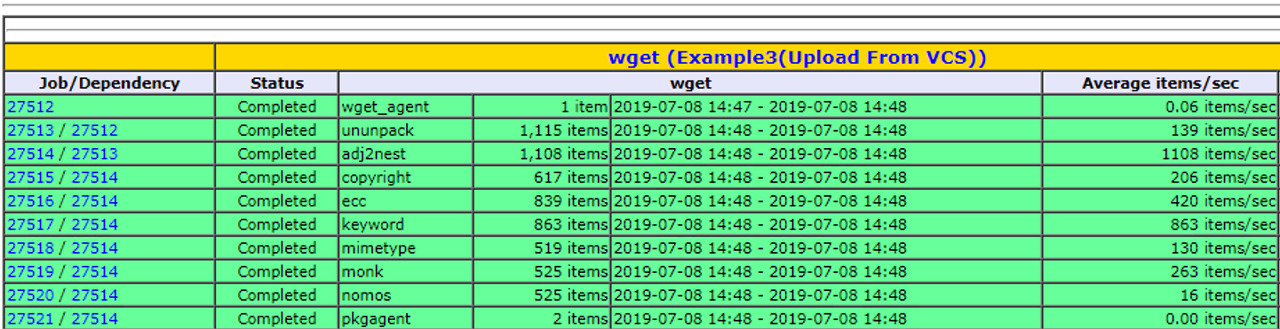
- The status of the analysis in progress can be checked at menu > Jobs > My Recent Jobs.
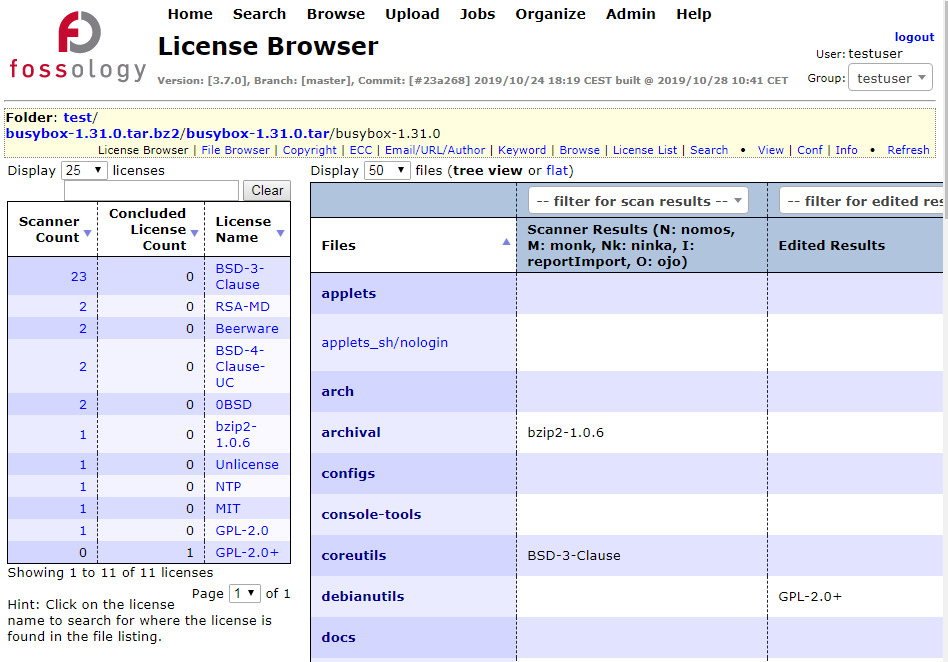
- Once the analysis is complete, the results can be checked at menu > Browse.
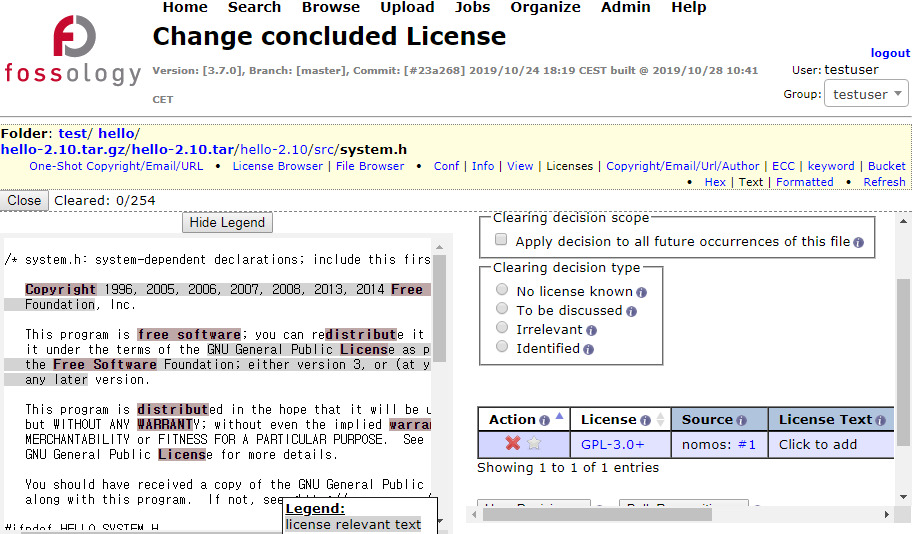
- Selecting an individual file allows you to check the license-related text detected by FOSSology.
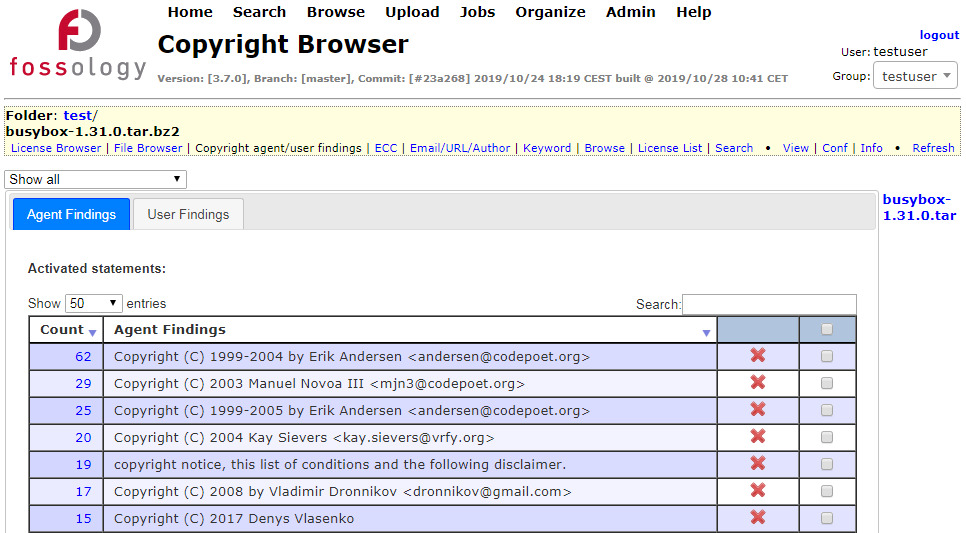
- menu > Browser > select a file or directory > Copyright/Email/Url/Author shows the Copyright/Email/Url/Author information detected by FOSSology.
After checking whether the results analyzed in this way by FOSSology are valid, users can exclude incorrectly detected items from the analysis results. FOSSology describes this as the Clearing process, and for more details, refer to the following page: https://www.fossology.org/get-started/basic-workflow/
In this way, you can easily check what the license of the open source you want to use is and what the copyright information looks like.
3.2 - SW360
A company that develops and distributes products containing open source must collect and track information such as the version and license of the open source used in each product and each release version. This allows the company to carry out proper open source compliance activities.
In particular, when a security vulnerability is reported in the NVD (https://nvd.nist.gov/vuln) for a specific open source version, if a company cannot trace which products use that version, it has no way of knowing which products need the security patch, leaving those products exposed to the security vulnerability.
For this reason, tracking open source information is essential. Companies build their own systems for this or purchase commercial services. SW360 is an open source project sponsored by the Eclipse Foundation that provides a web application and repository for collecting and tracking software BOM information.

Key Features
SW360 provides a web-based UI, and its key features are as follows.
- Tracking components used in a product
- Security vulnerability assessment
- License obligation management
- Generating legal documents such as notices

Installation
SW360 is composed of the following.
- Frontend : Liferay-(Tomcat-)based portal application
- Backend : Tomcat-based thrift service
- Database : CouchDB
For details on the project structure and the software required for installation, see the Required software section of the README: https://github.com/eclipse/sw360/blob/master/README.md
SW360 offers the following three installation methods. Users can choose whichever one suits them.
- Vagrant (https://www.vagrantup.com/)-based installation: Vagrant is a tool for managing virtualized instances, and sw360vagrant provides an environment for deploying SW360 all at once. : https://github.com/sw360/sw360vagrant
- The components of SW360 can be installed individually. : https://github.com/eclipse/sw360
- It can be deployed via Docker. : https://github.com/sw360/sw360chores
Here, we introduce how to install and deploy SW360 on a CentOS 7.6 system using the Vagrant-based method. For more detail, refer to the README. : https://github.com/sw360/sw360vagrant/blob/master/README.md
1) Prerequisites
To install SW360 on a Vagrant box, you must first install openjdk, VirtualBox, and Vagrant. First, install openjdk 1.8.0.
$ yum install java-1.8.0-openjdk
$ java -version
openjdk version "1.8.0_191"
OpenJDK Runtime Environment (build 1.8.0_191-b12)"
OpenJDK 64-Bit Server VM (build 25.191-b12, mixed mode)
Install VirtualBox.
$ sudo wget https://download.virtualbox.org/virtualbox/rpm/el/virtualbox.repo -P /etc/yum.repos.d
$ sudo yum install VirtualBox-5.2
If, when installing VirtualBox on CentOS 7, you get a “kernel module is not loaded” error, resolve it by installing kernel-devel and then reinstalling VirtualBox.
$ sudo yum install https://centos7.iuscommunity.org/ius-release.rpm
$ sudo yum install dkms
$ sudo yum install kernel-devel
# reboot
$ sudo /sbin/vboxconfig
$ systemctl status vboxdrv
● vboxdrv.service - VirtualBox Linux kernel module
   Loaded: loaded (/usr/lib/virtualbox/vboxdrv.sh; enabled; vendor preset: disabled)
   Active: active (exited) since Wed 2020-02-19 09:06:02 KST; 20min ago
Install Vagrant and the vagrant-aws plugin.
$ sudo yum install https://releases.hashicorp.com/vagrant/2.2.6/vagrant_2.2.6_x86_64.rpm
# install the vagrant-aws plugin
$ vagrant plugin install vagrant-aws
Then, clone the sw360vagrant code.
$ git clone https://github.com/sw360/sw360vagrant.git
2) Downloading Dependencies
To reduce the time it takes to build the Vagrant box, download the dependency packages in advance.
$ cd sw360vagrant
$ ./download-packages.sh
The following packages are then downloaded into the ./shared/package folder.
- Liferay 7.2.1 CE GA2 with Tomcat (9.0.17)
- Postgresql-42.2.9 ODBC client for Java as *.jar file
- 11 *.jar files required by SW360
- Thrift 0.11
- A box images from the Ubuntu 16.04 LTS (xenial-server-cloudimg-amd64-vagrant.box)
3) Creating the Base Box
Now, create the base box with the following commands.
$ cd generate-box
$ ./generate_box.sh
This step can take several tens of minutes.
4) Running the Box
Run the box with the following commands.
# If you have built a vagrant box from this directory earlier, you will have to destroy it first via
$ vagrant destroy
$ cd ../sw360-single
$ vagrant up
Running the box configures Liferay, PostgreSQL, and CouchDB. If it runs without issue, you can access the Liferay screen at https://localhost:8443/.

5) Deploying the SW360 Layout
The final step is deploying the SW360 layout on Liferay. This step is not yet automated, so an administrator must perform it manually. Access https://localhost:8443/ and log in with the following account.
- id : setup@sw360.org
- pw : sw360fossy
After that, follow the instructions on the following site to deploy the layout. https://github.com/eclipse/sw360/wiki/Deploy-Liferay7
Once the deployment is complete, you will see a screen like the following.

Basic Workflow
1) Registering Licenses
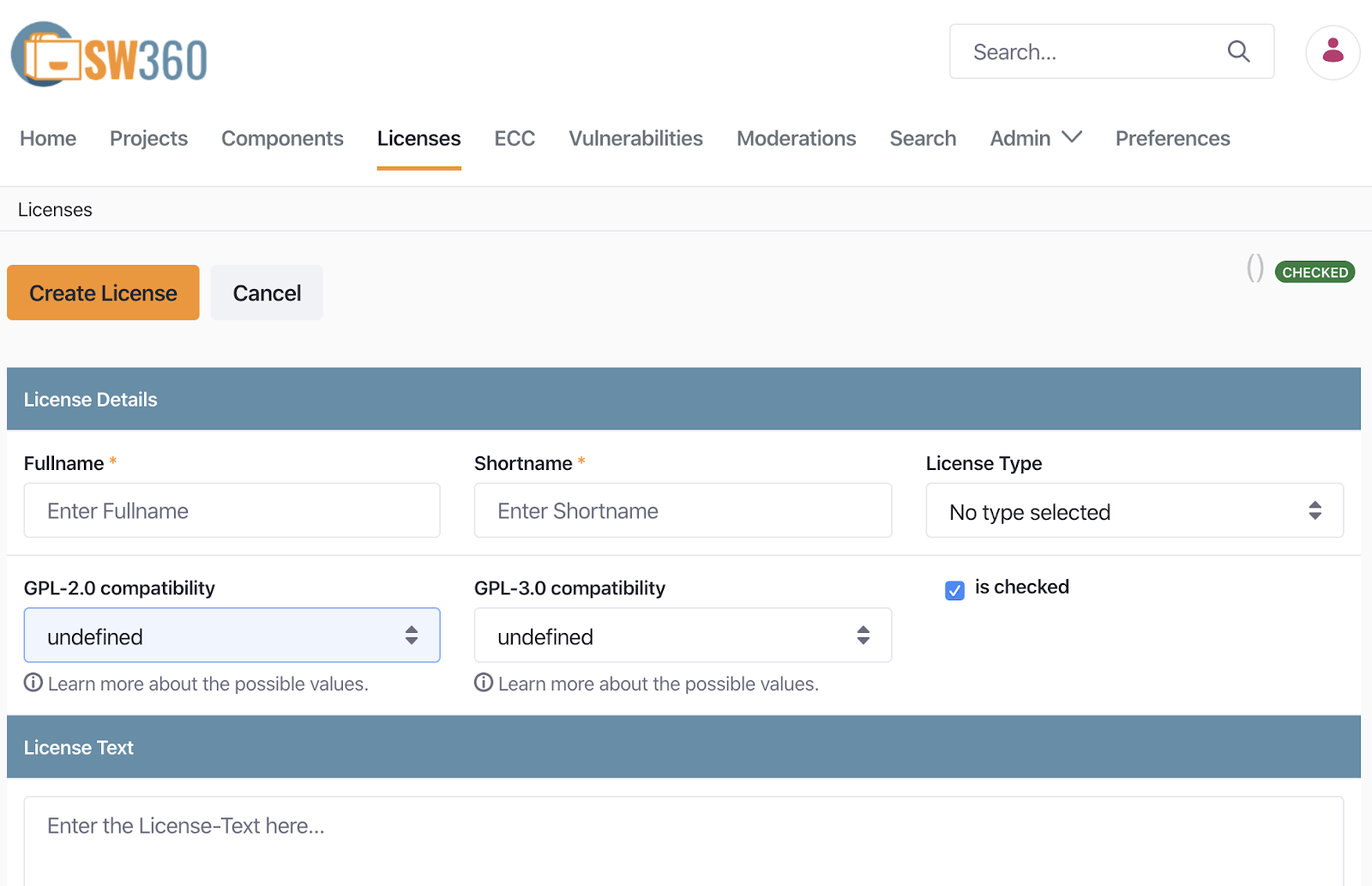
The first time you install SW360, you must register the open source licenses you commonly use. A license includes the following information.
- Full Name
- Short Name
- License Type
- GPL-2.0 Compatibility (e.g. yes, no)
- License Text
Selecting Menu > Licenses > Add License takes you to the Create License screen, shown below.
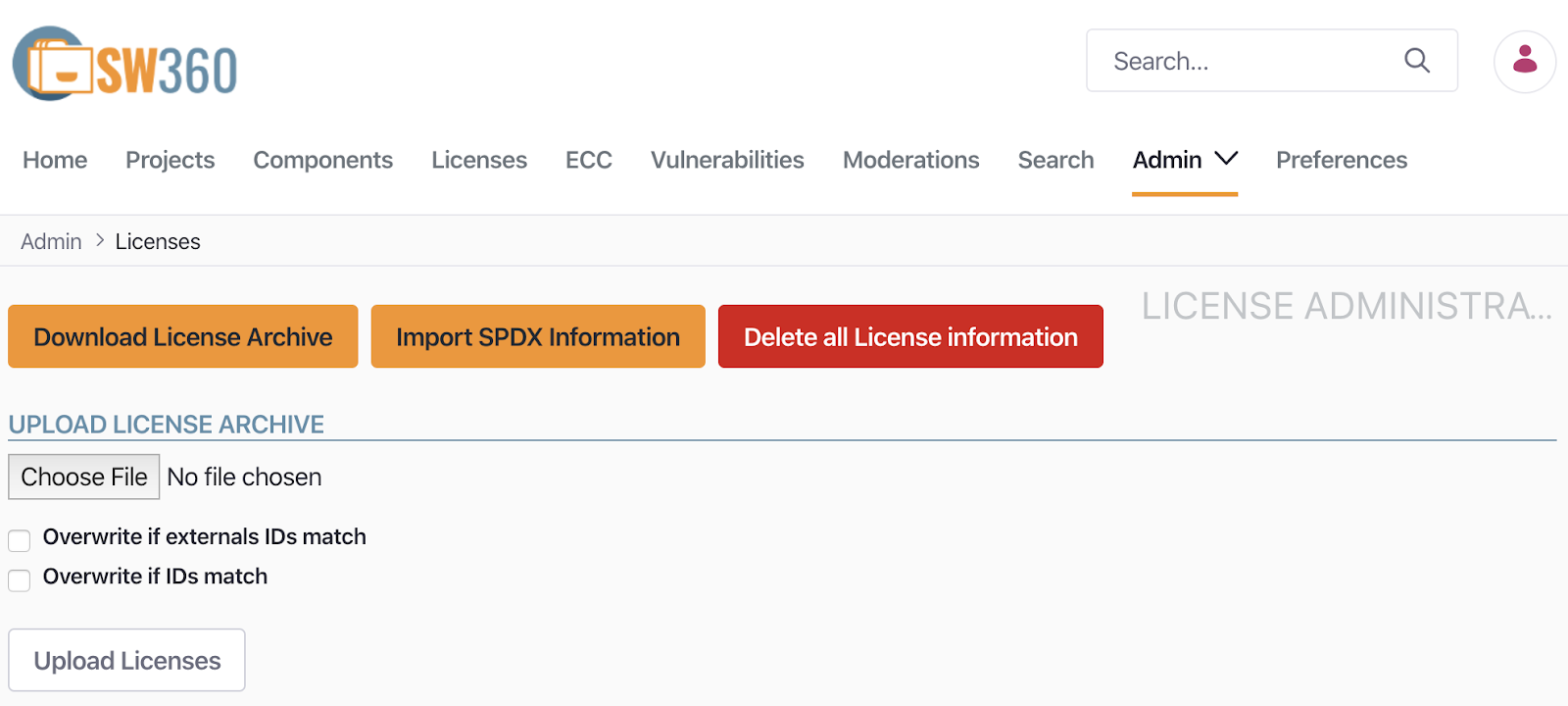
Registering licenses one by one this way can be quite tedious, but fortunately SW360 provides a feature to import the entire SPDX License List at once. Click Menu > Admin < Import SPDX Information.
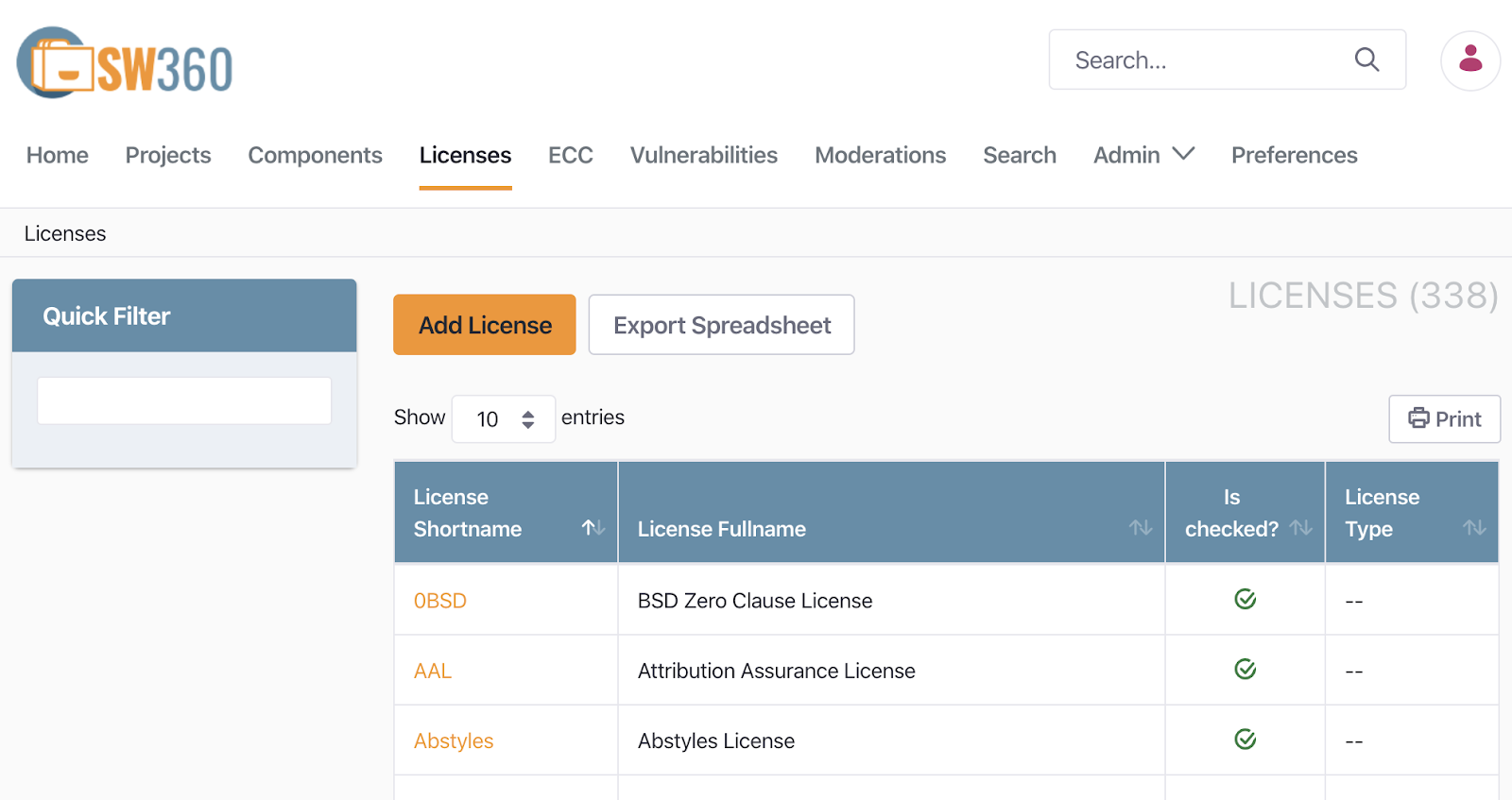
The SPDX License List is then registered automatically. You can confirm that 338 licenses have been registered under Menu > Licenses.
2) Registering Components and Releases
In SW360, a Component is a single unit of software. It can correspond to various kinds of software, including the following.
- Open source software
- Libraries
- Third-party software
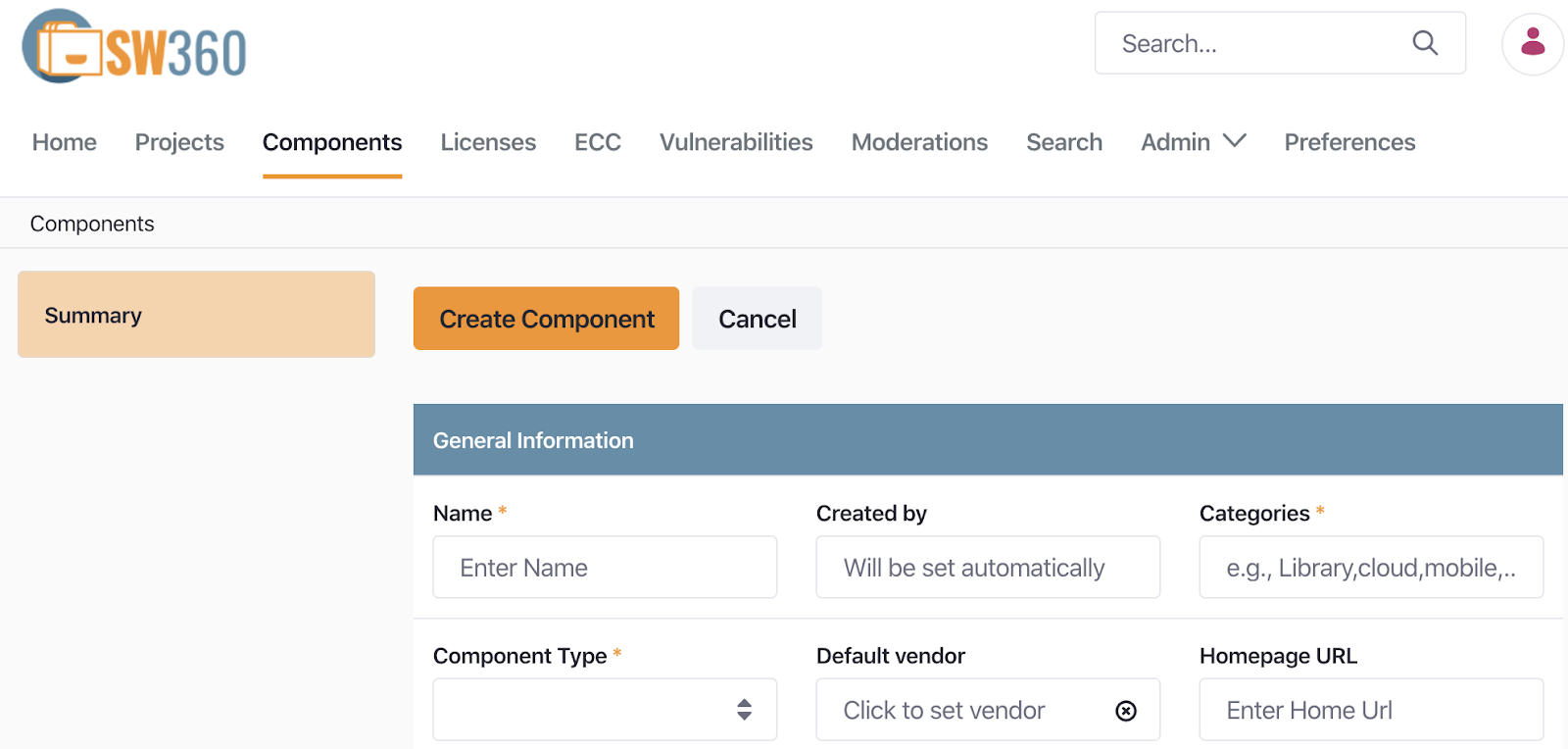
A Component includes the following information.
- Component Name
- Main Licenses
- Categories (e.g. Library, Cloud, Mobile, …)
- Component Type (e.g. OSS, Internal, InnerSource, Service, Freeware)
- Default Vendor
- Homepage URL
A Release is a unit that points to a single version of a Component. A single Component can therefore have multiple Releases. A Release is created and managed under a Component.
A Release includes the following information.
- Component Name
- Version
- License
- Download URL
- CPE ID (e.g. cpe:2.3:a:apache:maven:3.0.4)
For example, to register zlib-1.2.8, you would first register zlib as a Component, and then register zlib 1.2.8 as a Release. Selecting Menu > Components > Add Component takes you to the Create Component screen, where you can register information about zlib.
Once you have created the Component, you can register information for the zlib-1.2.8 version at Components > Releases > Add Release.
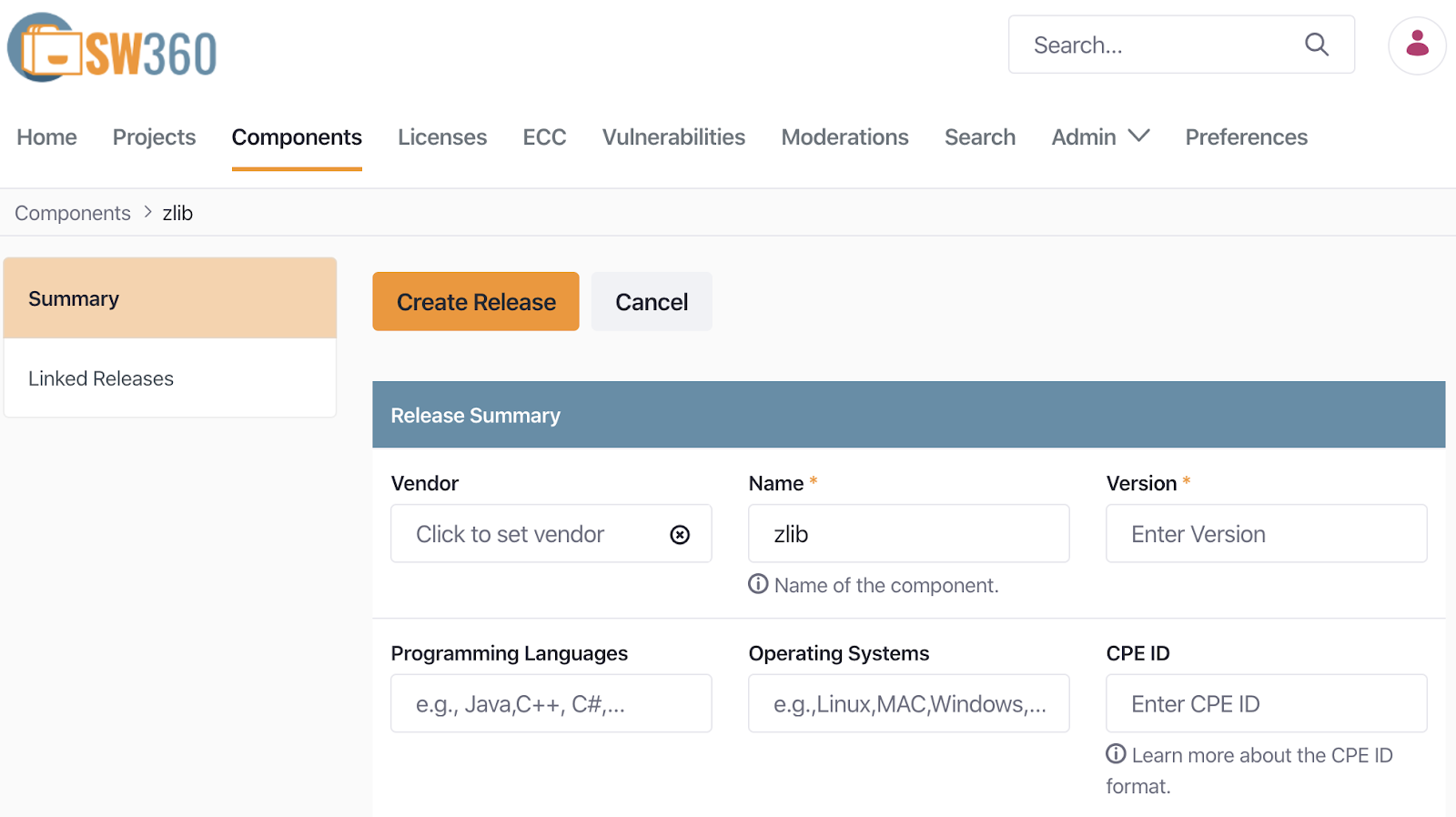
After registering versions 1.2.8 and 1.2.11 as separate Releases under the single Component zlib, the Release Overview screen shows the following two Releases.

SW360 also provides a feature for importing information for multiple Components at once. You can enter the Component information you want to register into the CSV template under Menu > Admin > Import / Export and import it.
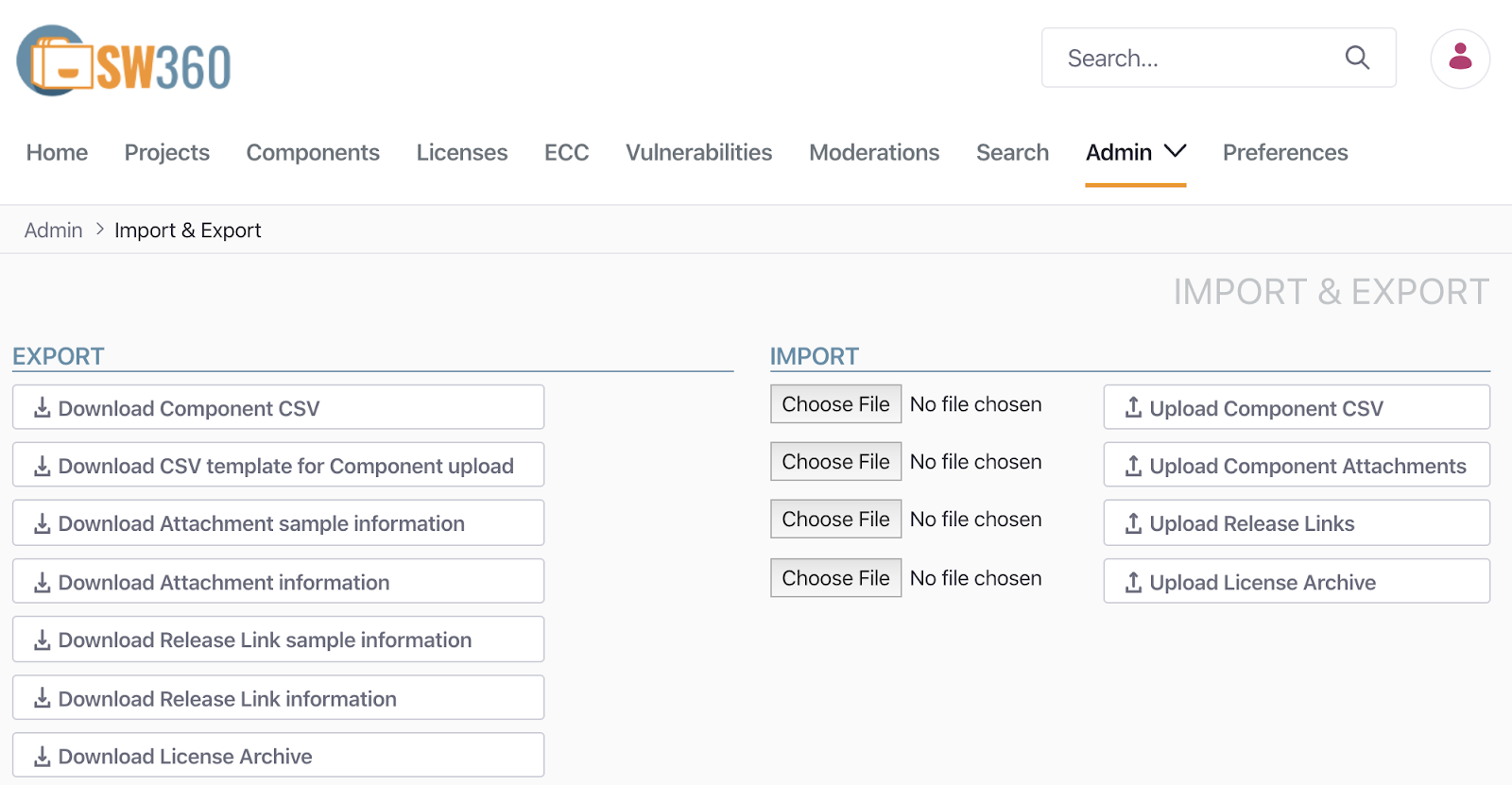
Note that, as of February 2020, this feature may not yet work reliably.
3) Creating a Project
A Project refers to a single product. Depending on the type of business, it could be a product, a service, or software. A Project registers and manages the Components/Releases used in the product.
When creating a Project, you register the following information.
- Project Name
- Version
- Project type (e.g. Product, Customer Project, Service, Internal Project, InnerSource)
You can create a Project via Menu > Projects > Add Project.
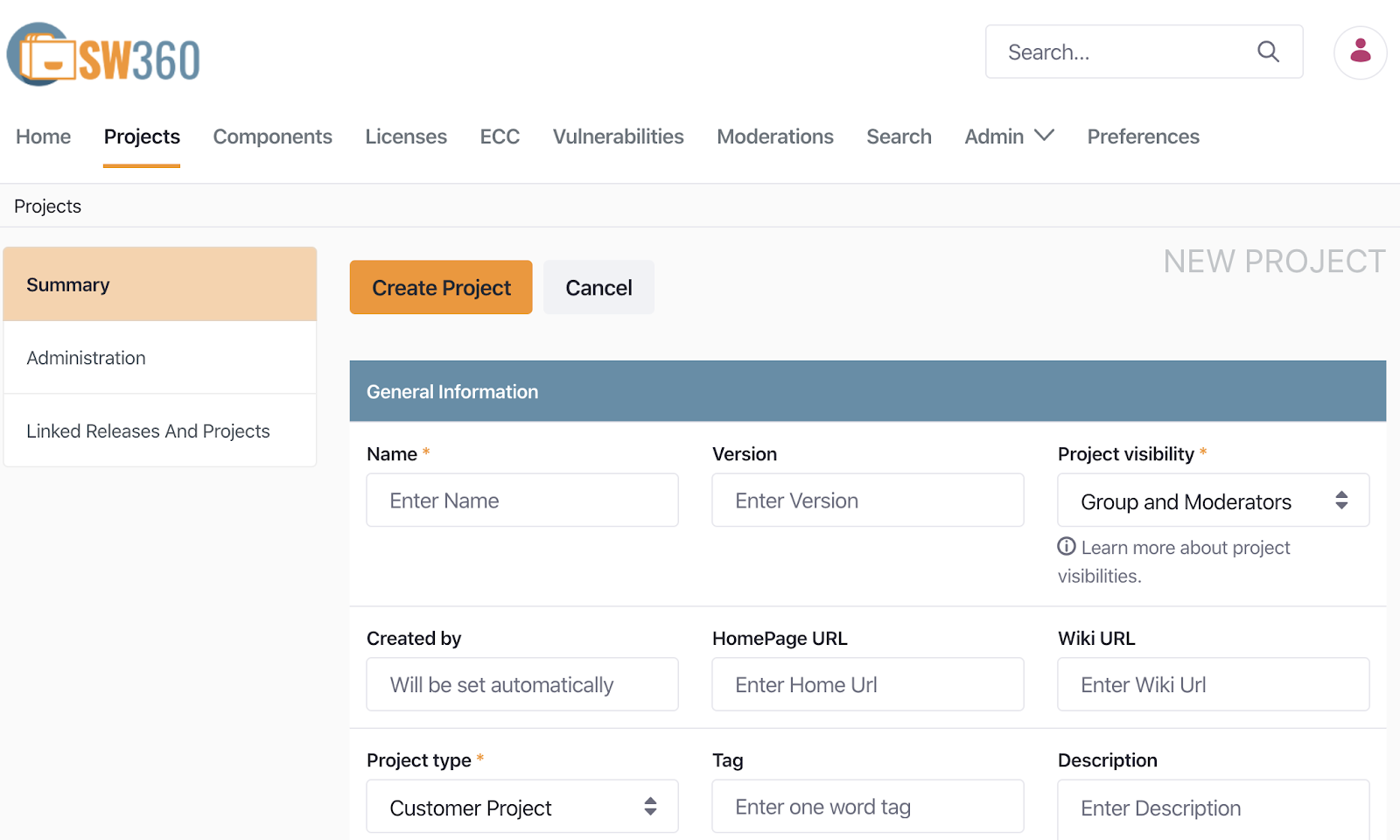
After creating a Project, register the Releases or sub-Projects it includes. Selecting the Project under Menu > Projects lets you register Linked Projects and Linked Releases under “Linked Releases and Projects.”
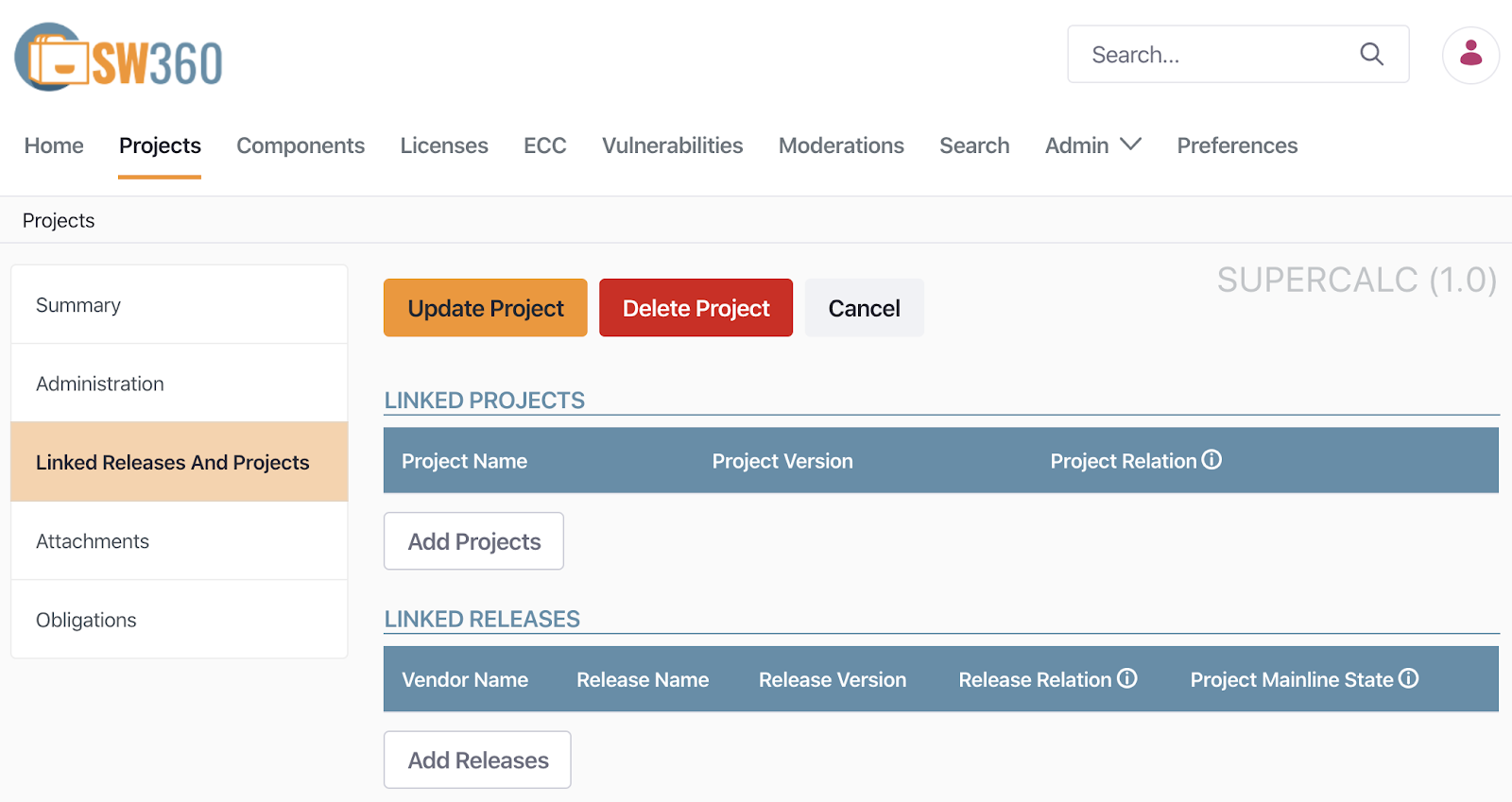
The following is the screen after registering OpenSSL 1.0.1 and zlib 1.2.8 as Linked Releases under a Project called SuperCalc.

4. Security Vulnerability Management
SW360 can automatically check whether a registered Release has a security vulnerability. To do this, SW360 provides a feature for scheduling periodic collection of CVE information. Under Menu > Admin > Schedule, you can set up a schedule to collect CVE SEARCH information every 24 hours.

With this schedule set, SW360 collects CVE information at the scheduled time from the CVE Search site (https://cve.circl.lu/). The collected CVE information can be viewed under Menu > Vulnerabilities.

Once Vulnerabilities information has been collected, you can check whether a created Project has any security vulnerabilities. In the SuperCalc Project created above, you can see that 85 security vulnerabilities have been reported.
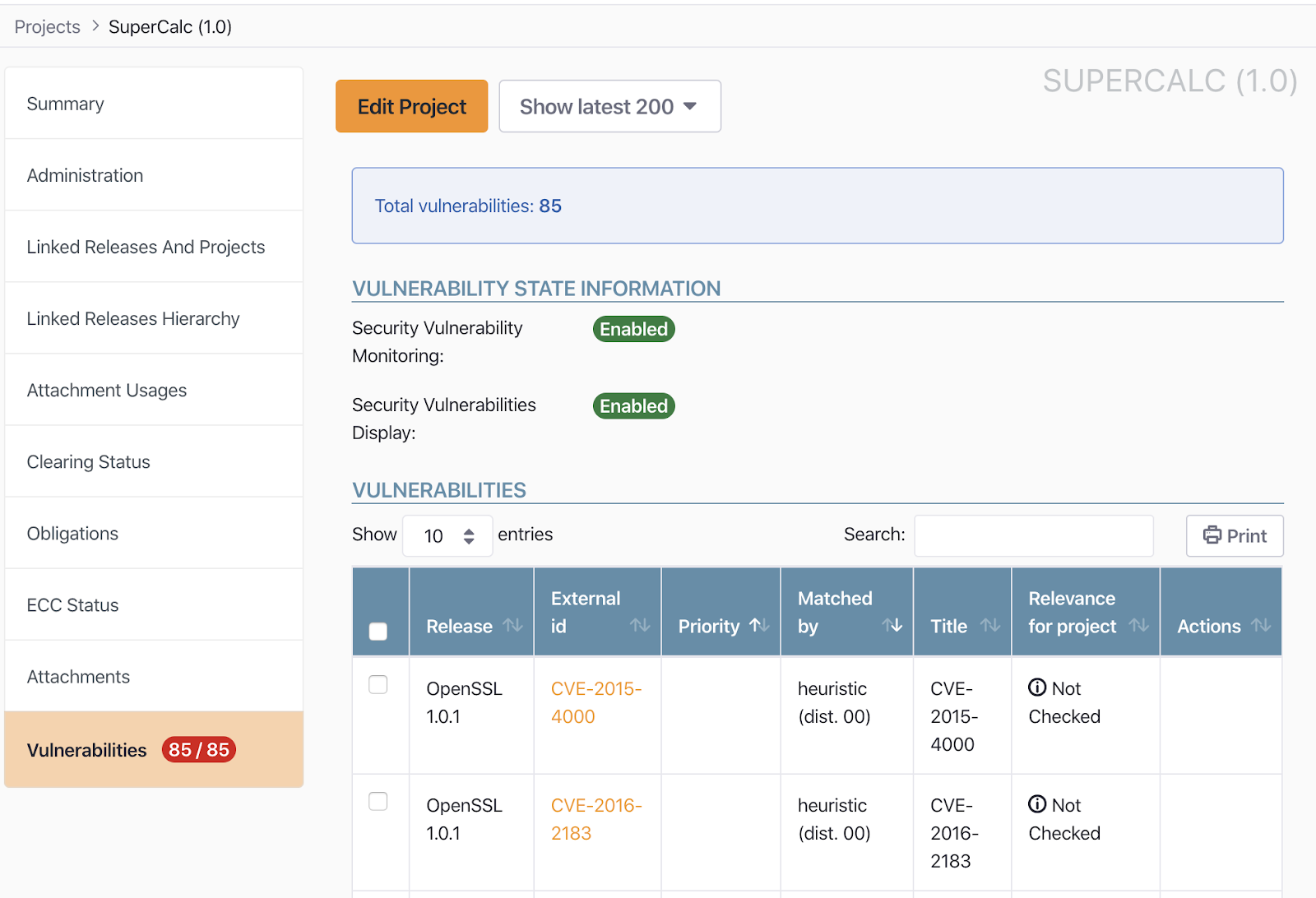
By registering and managing the software a company develops and distributes in SW360 this way, it becomes possible to manage not only open source compliance but also security vulnerability risk in a way that minimizes it.
SW360 also exposes most of its features as a REST API in addition to the web interface above, making it possible to integrate with other tools such as FOSSology. : https://github.com/eclipse/sw360/wiki/Dev-REST-API
In other words, by importing the analysis results of a source code scanning tool into SW360 and integrating it into DevOps to automate the registration of Projects and Releases, efficiency can be increased significantly.